Dolby Atmos
Audio, position metadata, and a renderer
Our REAPER mix was channel-based
- ReaSurroundPan distributed audio among eight channels
- Automation changed that distribution over time
- The exported 7.1 WAV stored those channel signals
- An Atmos object keeps audio and position metadata separate
Bed format and speaker layout
| Format | Channels | Role in this course |
|---|---|---|
| 7.1 | 8 | Our REAPER mix and room playback |
| 7.1.2 | 10 | Our Logic Atmos bed |
| 7.1.4 | 12 | A monitoring layout with four height channels |
The bed format and monitoring format are separate choices.
Beds and objects
- Bed: tracks combine into a channel-based submix
- Object: audio stays separate, with position and size metadata
- Either can contain stationary or moving sounds
- A stereo object track uses two object inputs
Two paths into the renderer
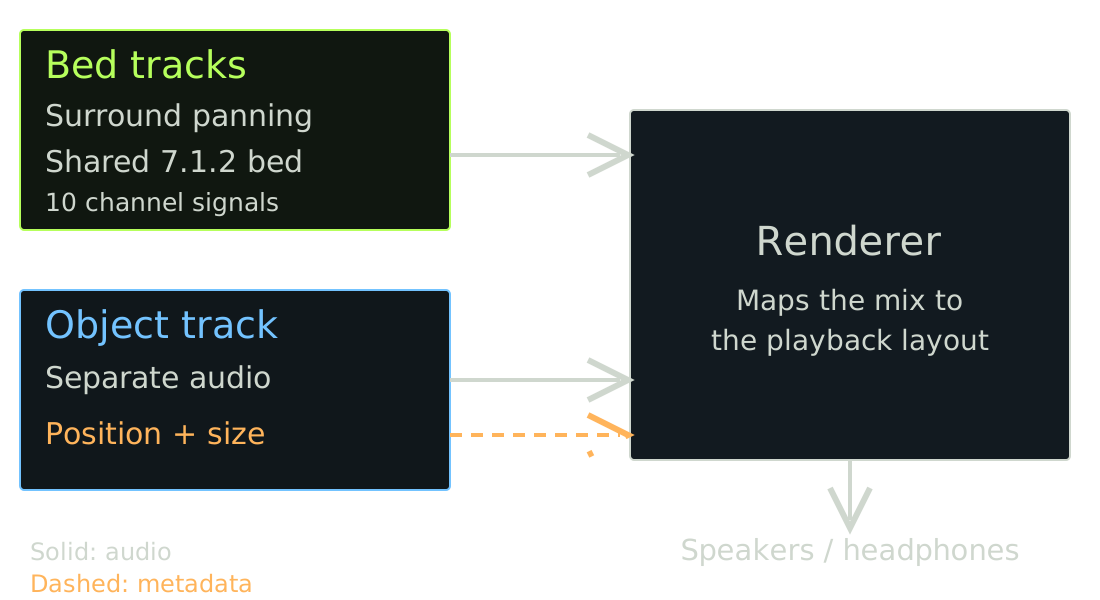
Simplified course diagram. Eventide routing reference · Logic signal paths
Rendering for the playback system
- Bed channel signals and object metadata enter the renderer
- The renderer creates outputs for the selected layout
- Headphones require binaural rendering
- Different playback systems still need listening checks
Ambisonics and Atmos
| Ambisonics | Atmos | |
|---|---|---|
| Stores | Encoded sound-field components | Bed audio, object audio, metadata |
| Positions | Encoded into component signals | Object positions stored separately |
| Playback | Decode for speakers or headphones | Render for speakers or headphones |
Both can preserve height and adapt to different playback layouts.
One bird, one background
- Ambisonics: encode the bird and traffic into a shared field
- Atmos: keep the bird as an object; place the traffic in the bed
- Rotate an Ambisonic mix and the whole field turns
- Move the Atmos bird object and its background can stay put
What would you need to move only the bird in a finished Ambisonic mix?
Listen to one placement change
- Hear a short excerpt with one object held in place
- Hear it again with one deliberate movement
- Compare a 7.1 speaker render with a binaural preview
- Describe what stayed clear and what changed
Two panners in Logic
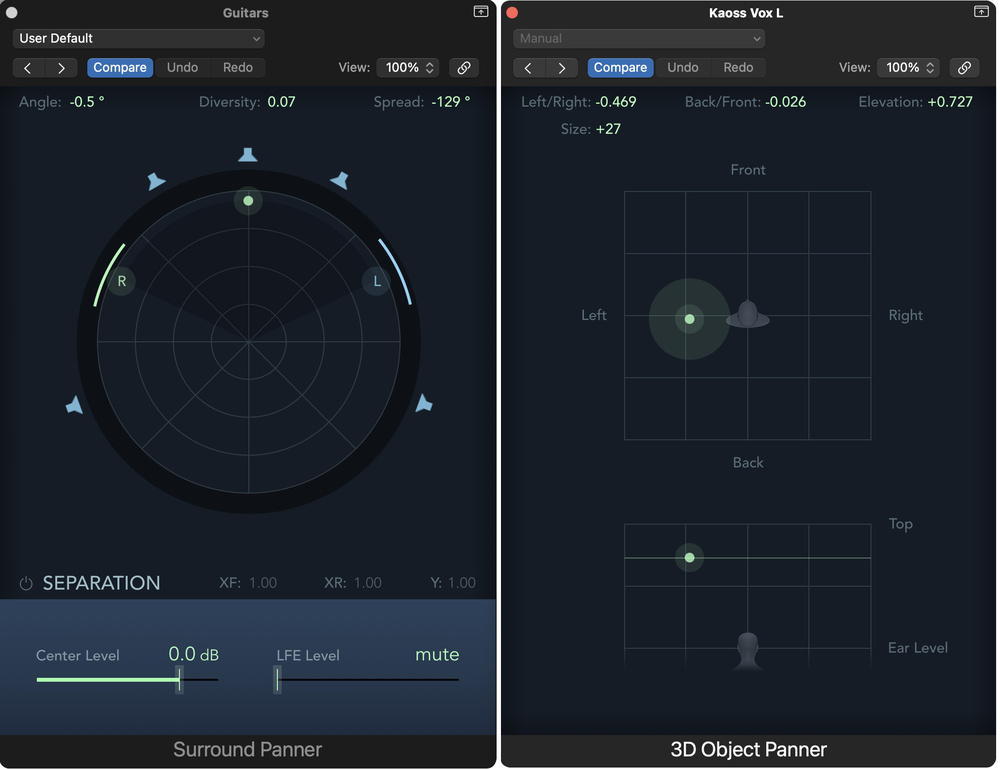
Choose a path and explain why
- A lead vocal that stays in front
- A sound effect that moves overhead
- A diffuse ambience or reverb return
Which would you put in the bed or an object? What control do you need?
Binaural monitoring
- Dolby Renderer modes: Off, Near, Mid, Far
- Off includes the sound without distance modeling
- LFE is fixed to Off in Logic
- Apple Renderer has Music and Movie previews
A master and a listening file
- ADM BWF: bed audio, object audio, and metadata
- Rendered WAV: a particular channel layout or binaural preview
- Playback encode: a service or device delivery format
- Project 4 requires the Logic project and ADM BWF
References: routing and monitoring
References: masters and delivery
Appendix: other Atmos tools
- Pro Tools Studio and Ultimate: integrated or external renderer
- Nuendo: internal authoring and external-renderer support
- Dolby Atmos Composer : adds Atmos authoring to other DAWs
Appendix: other immersive formats
- MPEG-H Audio: channels, objects, scenes, and listener interactivity
- IAMF: an open, codec-agnostic specification; Eclipsa Audio is based on it
- ASAF and APAC: Apple’s production format and delivery codec