Electronic sound production
Synthesis: building and shaping a sound
Same source, different articulation
Listen to a pluck and a pad on the same note.
- What changes at the beginning and end?
- Which control might explain the difference?
What you will be able to do
- Identify the oscillator, filter, and amplifier by their jobs.
- Predict a change in brightness or articulation.
- Save a pluck and a pad, then explain two choices.
The audio path
Oscillator → Filter → Amplifier → Output
- Oscillator: generates the raw sound.
- Filter: shapes its frequency content.
- Amplifier: controls its level.
Frequency sets the repetition rate and pitch.
Waveform changes the harmonic content and timbre.
Explore oscillators
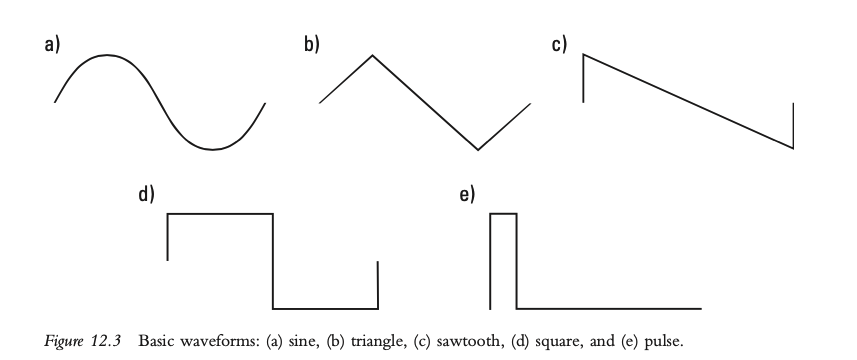
Predict, then listen: which sounds smoother, sine or saw?
Filters: changing brightness
A low-pass filter attenuates high frequencies.
Explore filters
Hold a saw note. Predict what lowering cutoff will do, then try it.
Filter responses
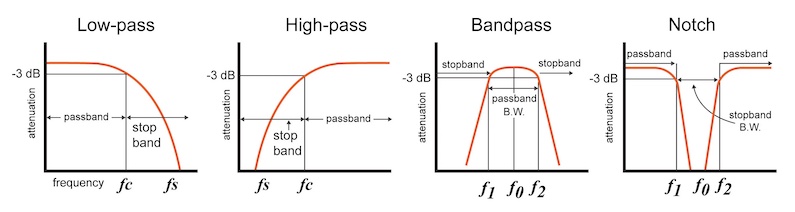
Which response would reduce a saw’s high-frequency buzz?
Check: pitch or brightness?
A held note becomes darker; its MIDI note stays the same.
Which is the likely change?
- Oscillator tuning
- Low-pass cutoff
Explain what you expect to hear if tuning changes instead.
Amplifier and envelope
The amplifier changes audio level.
The envelope controls how that level changes over time.
MIDI note-on starts the envelope.
Note-off starts its release.
ADSR: time and level
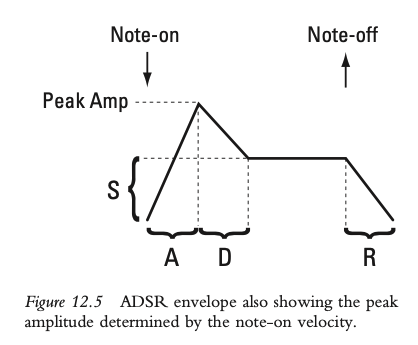
Attack, decay, release: time. Sustain: level.
Predict the articulation
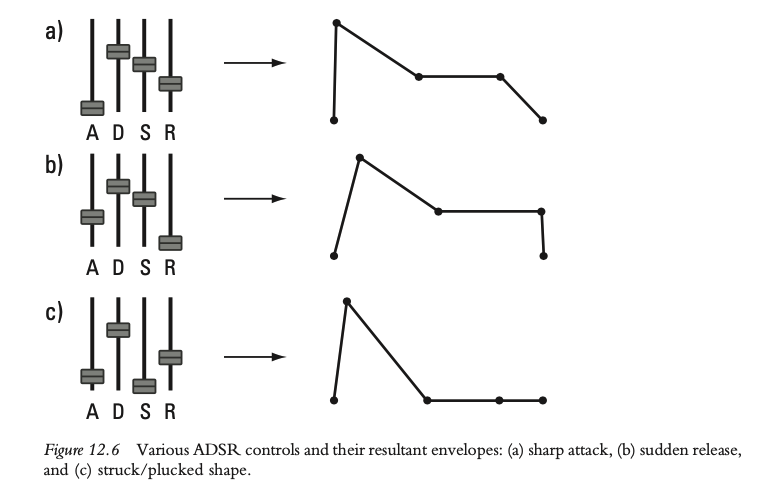
Which shape keeps fading while you hold the key? Why?
Guided Vital patch: pluck
- Right-click the preset name →
Initialize Preset. Use one saw oscillator, one unison voice, no effects. - Enable Filter 1 and its
OSC1 input. Use low-pass, cutoff about 2 kHz, low resonance. - In
Env 1: attack 5 ms, decay 250 ms, sustain 0%, release 100 ms. Delay and hold: zero. - Save as
YourName_Pluck_v1.
Your turn: pluck to pad
Keep the oscillator and filter unchanged.
- In
Env 1, try attack 400 ms, sustain 70%, release 800 ms. Leave decay at 250 ms. - Hold a note, then release it. Compare with the pluck.
- Save as
YourName_Pad_v1 and explain two changes to a partner.
Modulation: source and destination
A source changes a destination parameter.
Envelope → amplifier gain: note articulation.
LFO → filter cutoff: repeating brightness change.
Explore repeating change
Exit check
Play your pluck and pad for a partner.
- Trace the audio path and explain two envelope choices.
- Predict a cutoff change, then test it.
- Confirm that both presets are saved.
Optional history and reference
Different instruments offer different ways to shape sound.
Wendy Carlos and the Moog
Listen for a change in source, brightness, or articulation.
Buchla: shaping the source
What changes in the tone while a sound continues?
Yamaha DX7: another approach
Describe the attack and how brightness changes afterward.
Building a trumpet-like tone
- Listen to a recorded note’s attack and sustained tone.
- Inspect its harmonics and their relative levels.
- Combine sine oscillators, then shape their levels over time.
Synthesis methods: reference
- Subtractive: filter a harmonically rich source.
- Additive: combine simpler components.
- FM: use oscillators to modulate other oscillators.
- Wavetable: select or scan waveform frames.
Further exploration
Open the Synth Playground
Choose one sound to change. Predict, adjust one control, and explain what you hear.